Replies
No one has replied to this post.
It's because the FIS upload on the PDSAT is looking for a .zip file, which it sounds like you're not getting. If you go into Settings on FIS and tick "Export to Access and CSV" you'll get a zipped version of your ILR once it's been processed, which you can then upload to the PDAST.
You shouldn't need to stay logged in, unless they've programmed it very strangely... but my advice would just be to leave it chugging away on a tab while it's still in it's 'beta' stage. Change is always a pain at first... but all great changes are preceded by a touch of chaos ;)
Hi Both,
I am also struggling with getting connected at the moment with the SQL string, and was just reading the above, from reading this, am I correct that you no longer need to do that, and hopefully it is just as simple as ticking the export to access and CSV box instead and you will get the FIS file to upload onto the PDAST instead? Many Thanks
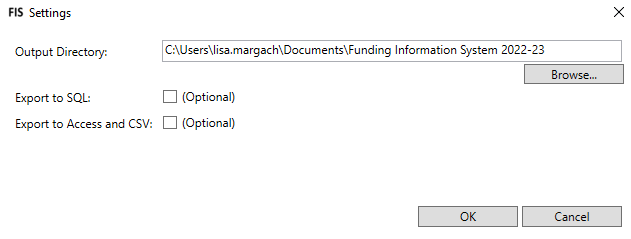
@... That is correct. you can tick export to Access & CSV instead or as well as the SQL export (you may be using this for something else)
I've managed to get it up and running now, but it does seem to take time to process the data and disappointingly, the first release doesn't have the sample generator in yet.
Hope this helps
Thanks Andrew, I will give this a go as hopefully this is an easier way to get it sorted, as I just cannot get the SQL export to work, and was only using it to get something I could then upload to the PDSAT.
I know other functions on the system are slow in comparison to the old one aren't they which is disappointing, thanks for letting me know about the sample generator as I wanted to try that after I can get a FIS file uploaded. Wish me luck!!
Hey all, thought I would jump on and see if you are experiencing the same issue as me.
When exporting the ILR from FIS to CSV, I go into the folder and upload the FIS-CSV_#####-## zip - this is correct right?
Previously have always used the string to this in new using the zip from FIS. however when using this Zip folder, PDSAT keeps failing the upload so starting to think its the wrong file.
Andrew Dickens
PDSAT Online FIS Uploading
Created
Hi,
this might be a very silly question, I've finally managed to gain access to the new PDSAT online this morning, but am having issues with uploading a return that has gone through FIS.
In the old offline version, you recorded your "string" from FIS, and away it went. Now with the online version it is asking you to select the specific FIS file (like you would if it was an ILR, but there isn't one is there? It just gives you all the individual reports.
Am I missing something fundamentally simple on a Monday Morning?
Thanks